

What Is a Robotic Arm?
Links, Joints, and a Tool at the End
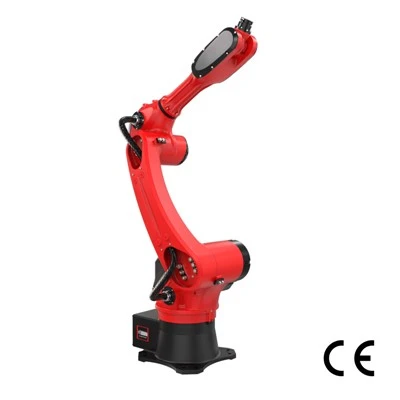
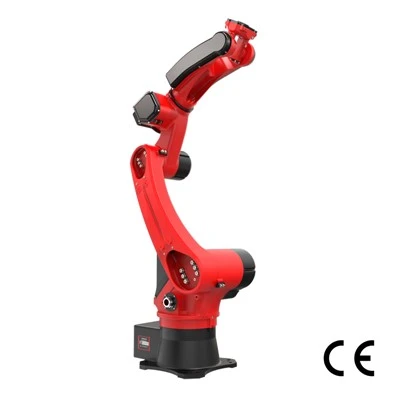
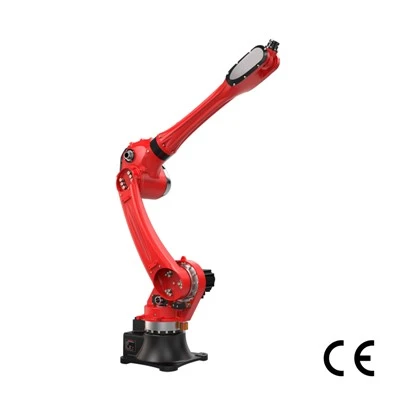
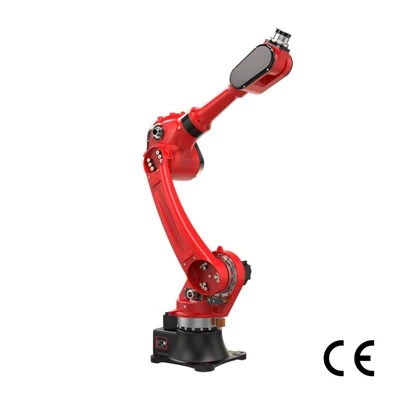
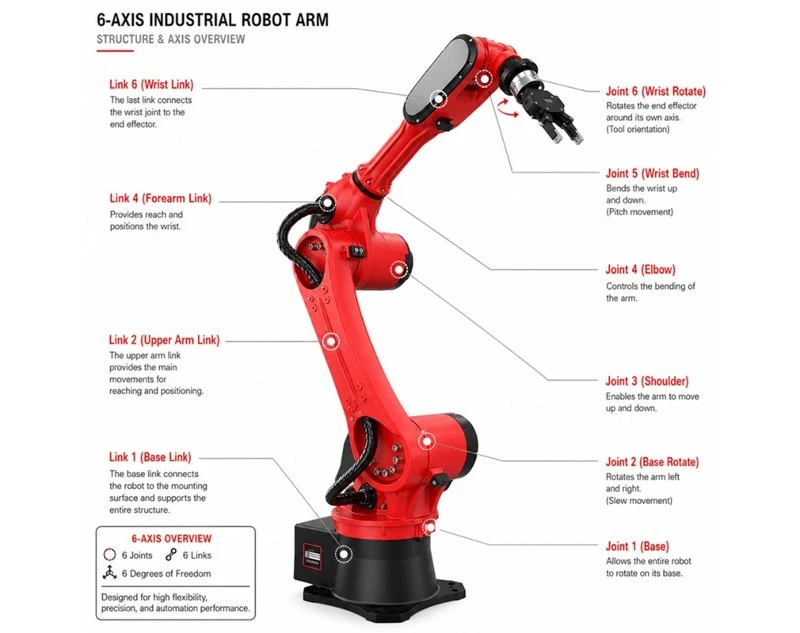
A robotic arm is a set of powered segments-called links-connected by motorized joints, with a tool mounted at the far end. Those three parts are the whole story: the links provide reach, the joints provide movement, and the end effector-a gripper, welder, or whatever the job calls for-does the actual work. Picture your own arm: bones, joints, and a hand. But "robotic arm" is only one of several names for this machine, and they get used interchangeably far more often than they should.
Robotic Arm vs Industrial Robot vs Cobot vs Manipulator
Here's the part most sites skip: these four terms don't sit at the same level, and one of them means something very specific once you're in injection molding.
Robotic arm is the everyday name for the articulated hardware itself-the links, joints, and end effector we just described.
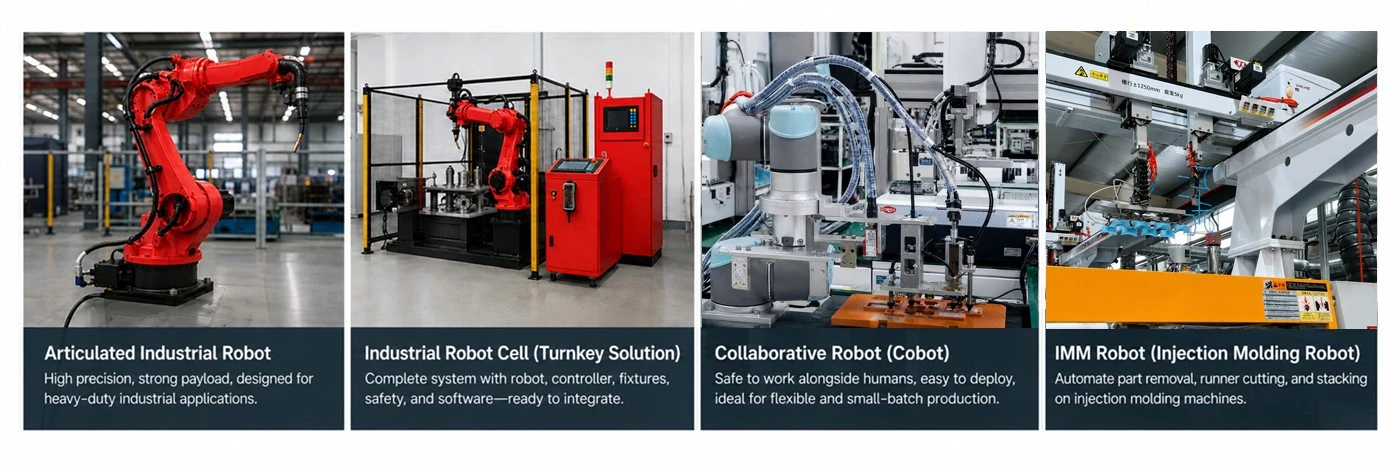
A manipulator, in injection molding, isn't a synonym for that arm-it's the take-out robot: the unit mounted on the molding machine that reaches into the mold, grips the finished part or runner, and lifts it clear each cycle. It's usually a linear, Cartesian design, not the articulated arm most people picture. So here "manipulator" names a specific demolding robot, not the general hardware.
An industrial robot is the complete machine in a factory: the arm plus its controller and drive system, built for production. Every industrial robot contains a robotic arm, but the phrase points at the whole working unit-so the real distinction in robotic arm vs industrial robot is part versus packaged product.
A cobot (collaborative robot) is a subtype defined by intent, not shape. It's a robotic arm engineered to work safely alongside people-slower, force-limited, often no cage required. The robotic arm vs cobot question isn't "which is which" but "is this arm built to share space with humans?"
Three Things People Get Wrong About Robotic Arms
1. Buying a robot doesn't automate anything. An arm on its own can't do useful work until there's a system around it. Real automation needs a full cell-fixtures, sensors, safety, part feeding, and a controller tying it together. The arm is one component of that system, not the system itself.
2. Repeatability isn't accuracy. A datasheet bragging about ±0.02 mm almost always means repeatability-how tightly the arm returns to a point it was taught-not how precisely it hits a coordinate it was never taught. For anything resembling machining, that gap matters enormously.
3. More axes isn't automatically better. A 6-axis arm is more flexible, but flexibility you don't need is just added cost, complexity, and more places to introduce error. Plenty of jobs run faster and more reliably on a 4-axis arm.
How Does a Robotic Arm Work?
The Motion Chain
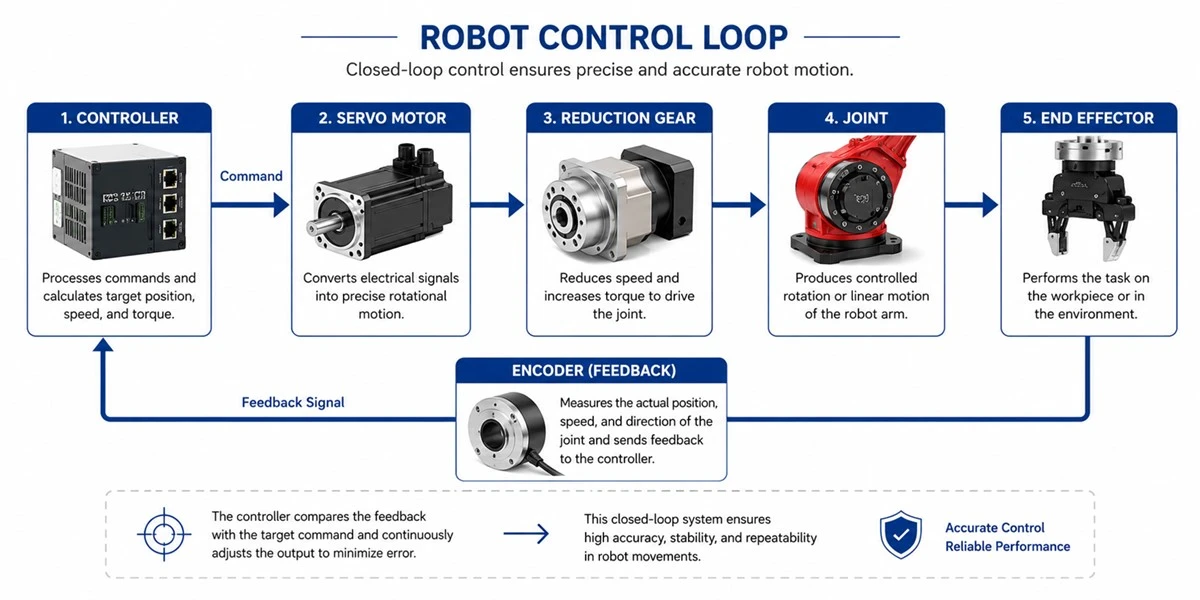
So how does a robotic arm work, moment to moment? Every motion runs down the same chain. The controller calculates the trajectory-where each joint needs to be, and when. It sends those targets to the servo motors, which supply the drive. Each servo feeds a reduction gear that trades speed for torque, so a small, fast motor can move a heavy arm slowly and precisely. That turns the joint, and the joints together position the end effector, which does the actual job-gripping, welding, dispensing. And it's a closed loop: encoders on each joint report their real position back to the controller, which corrects on the fly.
Axes and Degrees of Freedom
Everything in that chain serves one goal: putting the tool where you need it, at the angle you need. That's what axes and degrees of freedom describe-and it's where a lot of buying decisions quietly go wrong.
Each axis is one joint that moves independently; the number of independent motions is the arm's degrees of freedom. On a standard 6-axis arm, the work splits cleanly into two halves. Axes 1–3 handle position-they get the tool to a point in space (left/right, forward/back, up/down). Axes 4–6 handle orientation-they set the tool's angle once it's there (the roll, pitch, and yaw of the wrist).
That split is the whole selection rule. Ask what your process actually demands:
Welding needs the torch to meet the seam at a specific angle and hold it while following the joint. Position alone can't do that-you need wrist orientation. That's why welding is almost always 6-axis.
Palletizing mostly means pick a box, lift, rotate, set it down flat. Up-down plus a spin covers it, so a 4-axis arm does the job faster and cheaper, with less to go wrong.
A quick rule of thumb: need to tilt or rotate the tool to do the job? Think 6 axes. Only moving up-down and spinning? 4 may be plenty.
What Sensors Actually Do
An arm is only as good as its sense of where it is-and what it's touching. Three sensor types carry that load, but they don't matter equally.
Encoders report joint position-the backbone of the closed loop. The distinction that actually bites you is absolute vs incremental encoders. An incremental encoder counts movement from wherever it sat at power-on, so after a power cut or shift change the arm often has to run a re-homing routine before it can work. An absolute encoder stores its real position whether it's powered or not. Picture a Monday morning: an arm with absolute encoders comes on already knowing where every joint sits; one on incremental encoders may first have to crawl back to a home reference. Across every shift change and outage, that stops being a footnote.
Force-torque sensors give the arm a sense of touch. Feeling contact force-rather than blindly driving to a position-is what makes insertion (seating a part without jamming) and grinding or polishing (riding a surface at steady pressure) possible.
Vision handles the unknown: when parts arrive unfixtured-loose in a bin, or at varying spots on a belt-it locates them so the arm adapts instead of expecting the part in one taught spot.
References on Force-torque Sensors: [https://arxiv.org/pdf/2103.11123]
Kinematics in Plain English
You type a coordinate, and the arm just goes there. Behind that is inverse kinematics, and the cleanest way to feel it is your own arm.
Reach for a cup on the table. You didn't compute anything-but your brain instantly worked out how far to bend your shoulder, elbow, and wrist to land your hand exactly there. That's inverse kinematics: start from where the tool needs to be, and solve backward for the joint angles that put it there.
Forward kinematics is the return trip-given the joint angles, where does the hand end up? Easier to compute, but less often what you actually need.
Every move your arm makes, the controller is quietly solving forward and inverse kinematics: you name the destination, it finds the angles. That's the whole trick-no wall of formulas required.
References on Robot Arm Kinematics: [https://arxiv.org/pdf/2303.09645]
Where Precision Really Comes From
A perfect kinematic solution still lands wrong if the hardware can't hold it. Real precision comes from three physical things that compound.
Reduction gears-right type, right place. RV reducers sit in the base and lower axes: stiff, built to shrug off heavy loads at reach. Harmonic (strain-wave) reducers sit in the wrist: compact, light, near-zero backlash, for where the payload is small but precision is critical. Put a harmonic drive where an RV belongs and the arm flexes under load-it isn't about which is "better," but where each fits.
Rigidity. Any give in the structure shows up magnified at the tool tip: a tiny angular deflection at a joint becomes a large error a meter away. A rigid arm holds the taught point under load; a flexible one drifts off it as soon as the payload or motion changes. It's a big reason two arms with near-identical spec sheets don't perform identically.
Thermal drift. As motors and gears run, they warm, the metal expands, and the tool's position shifts-usually most in the first hour from a cold start. That's why high-precision work begins with a warm-up: run the arm until it reaches thermal steady state, then trust its numbers. We've seen cold-start drift quietly wreck first-article checks everyone had blamed on programming.
The practical version: need ±0.02 mm-class repeatability for first-article inspection? Don't measure on a cold machine-let it warm up first.
Want to see how these components come together in a real arm? See RBTIC's 6-axis robot specs →
The Main Types of Robotic Arms
Articulated (6-Axis)
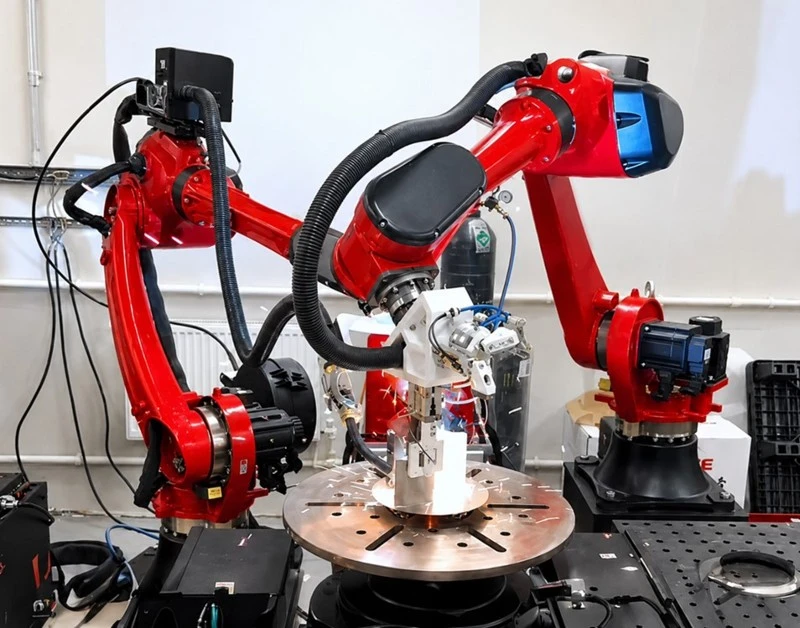
The articulated robot-typically a 6-axis arm-is the default for a reason: it's the most flexible shape, with the orientation reach to work at almost any angle. It covers the widest range of jobs: welding, assembly, machine tending, loading and unloading. The trade-off is cost and programming complexity-all that freedom has to be paid for and taught.
When not to use it: for pure high-speed, lightweight pick-and-place (a Delta is faster), or simple flat, top-down transfer (a SCARA does it cheaper).
SCARA
A SCARA robot owns fast top-down work on a flat plane-high-speed pick-and-place, assembly, dispensing. It's quick, affordable, and rigid in the horizontal plane, which is exactly where those jobs happen. The limits are the flip side: little vertical freedom and weak orientation control, so the moment a task needs the tool at an angle or real up-down dexterity, SCARA isn't your arm.

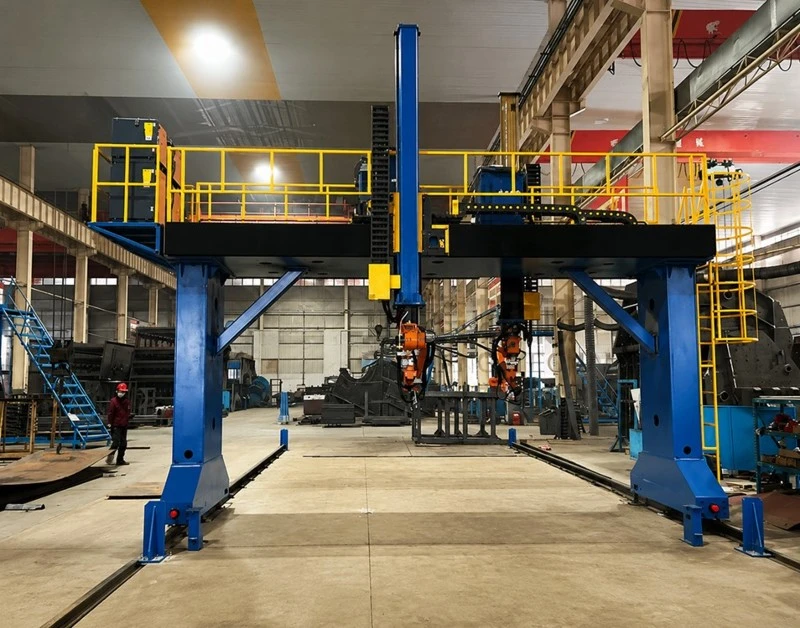
Cartesian / Gantry
When you need a large working envelope but the motion is simple and straight-line, a Cartesian or gantry robot fits. Its strokes are easy to understand and can be customized to almost any size, which makes it a natural for moving big parts or truss-style loading. The trade-offs: it takes up a lot of floor space, offers little orientation ability, and won't win on speed.At the other extreme is a small payload that demands extreme speed.
Delta / Parallel-Link
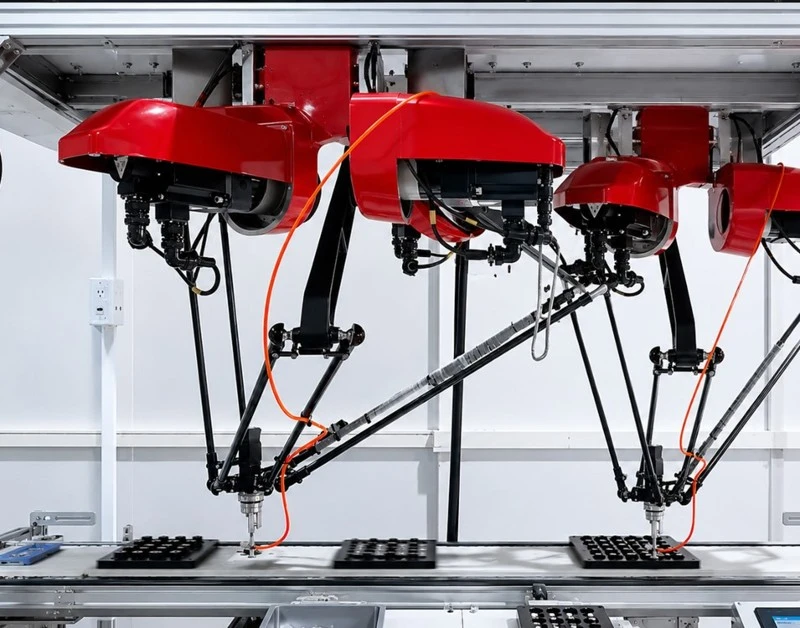
A Delta, or parallel-link robot, is built for one thing: blistering speed at very low payload. Its parallel structure makes it the fastest arm on the floor for high-speed sorting in food, pharma, and electronics-and it pairs naturally with vision for random picking . But that speed is bought with payload: Deltas carry very little, work inside a shallow bowl-shaped envelope, and are the wrong tool for anything heavy.Those are all conventional industrial arms. One more class is built specifically to share space with people.
Collaborative Arms (Cobots)
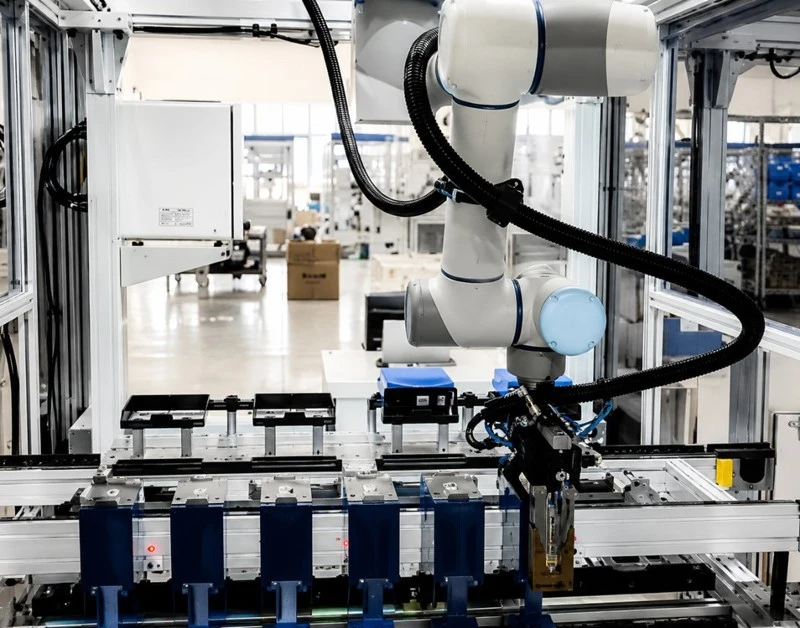
A collaborative robot is built to work near people without a cage-which makes it fast to deploy, easy to move between tasks, and well suited to mixed human-robot lines and high-mix, low-volume work.
But that safety has a price, and it's worth naming. In force-limited mode-the mode that lets it run cage-free-a cobot is slower, and cobots generally carry less payload than industrial arms. And "collaborative" doesn't mean "risk assessment optional": a sharp tool or a heavy part on the end still needs one. So the honest framing of cobot vs industrial robot isn't safer-versus-dangerous; it's a different trade.
The judgment call: frequent human interaction + low-to-moderate takt + tight space → a cobot earns its keep. High takt, heavy payload, or a fenced-off automation zone → a conventional arm with proper guarding will beat it. The common mistake is buying a cobot to hit an aggressive takt time, then running it at force-limited speed and missing the target anyway.And there's one class almost every guide skips-which happens to be our home turf.
Injection Molding Take-Out Robots
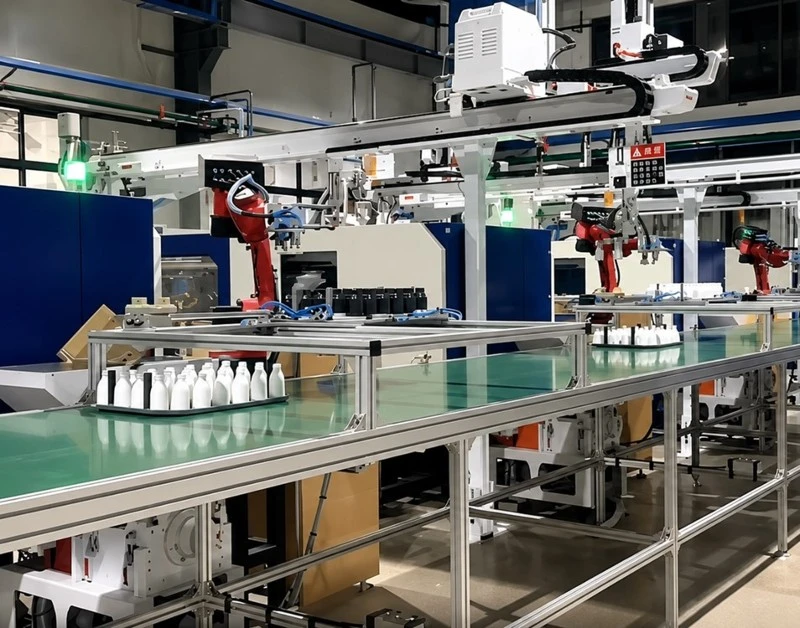
An injection molding take-out robot (often called an IMM robot-a three-axis servo manipulator, or a simpler sprue picker for gates and runners) reaches into the mold the instant it opens, removes the finished part, separates the runner, and can place inserts for the next shot.
What makes it its own type-not just a Cartesian arm parked on a molding machine-is timing. It's synchronized to the molding cycle: every motion is choreographed around mold open and close, so being a fraction of a second out of place either slows the cycle or risks the tool. That deep coupling is why a general-purpose arm rarely does this job well.
The 6 Specs That Decide Whether an Arm Can Do Your Job
Payload
The robot payload spec is where selection goes wrong first, because people size to the part weight and forget the hardware holding it. An 8 kg part on a 4 kg gripper is a 12 kg load-so you need at least a 12 kg-rated arm, not an 8 kg one. And weight isn't the whole story: the farther the load sits from the wrist flange, the more moment it creates, so an off-center or extended part behaves like an even heavier one. Size to part + gripper + reach offset, never the part alone.
Reach vs Work Envelope
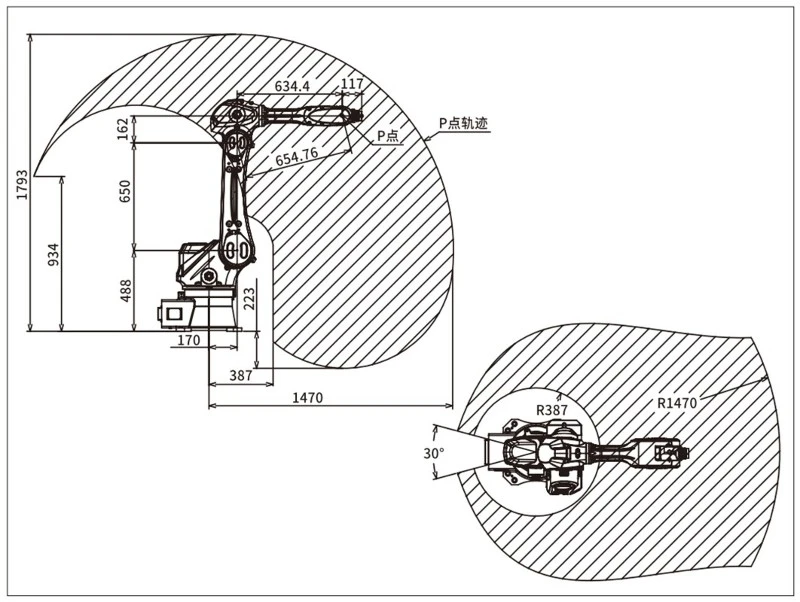
Data sheet reach is the single longest distance the arm can extend-but that's not the space you can actually use. The real robot work envelope is a lumpy, irregular volume, and at its outer edge the arm can touch a point yet often can't reach it in the orientation your job needs. Close to the base and out at the extreme ring are effectively dead zones. So read reach vs work envelope as "maximum stretch" versus "usable, full-pose workspace"-and design for the latter.
Repeatability vs Accuracy
This is the spec almost everyone reads wrong.
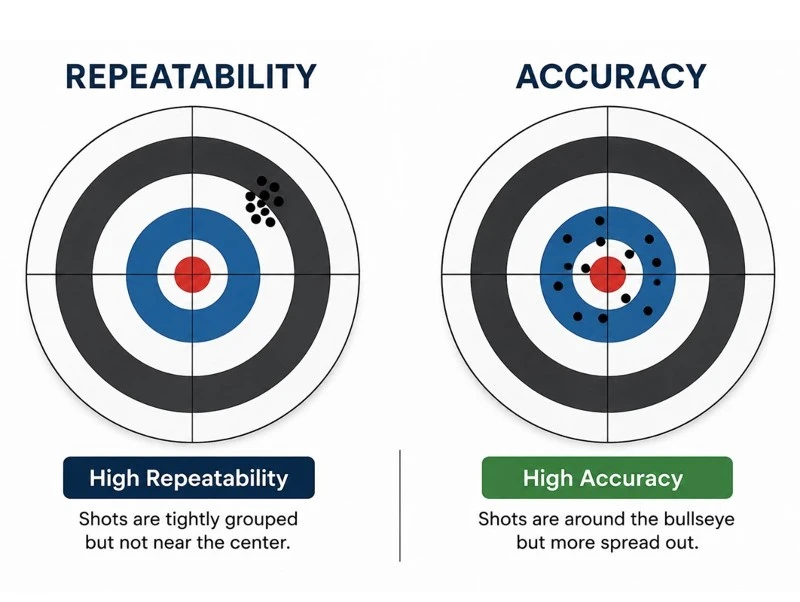
Repeatability is the ability to return to the same point over and over-even if that point is off. ±0.05 mm repeatability means the arm hits the same spot to within 0.05 mm every time; it says nothing about whether that spot is the one you actually wanted.
Accuracy is the different, harder ability to reach the correct point in space. Nearly every datasheet number is repeatability.
For welding or palletizing-teach the point once, repeat it forever-repeatability is all you need. Accuracy only becomes critical with absolute positioning: offline programming, or dropping a taught path onto a new part without re-teaching. Put bluntly: ±0.05 mm is the ability to return precisely to the same wrong point.
Speed & Cycle Time
Datasheet speed is a peak-maximum joint speed, unloaded, in a straight burst. Your line's cycle time is built from everything that burst leaves out. Real motion spends time accelerating and decelerating at every move; in path planning around corners and obstacles; in the dwell at each pick and place while the gripper opens or closes; and in I/O handshakes, where the arm waits on a signal from a conveyor, PLC, or machine. Add a real payload and top speed drops further. That's why the catalog number never equals takt time.
If you need a real one, simulate it-or have your integrator estimate cycle time on your actual path and payload, not the spec sheet's.
Axes
Here's just the decision. Ask:
Does the tool need to tilt, flip, or approach at an angle? → 6 axes.
Does it need to reach around an obstacle or hold a complex pose? → 6 axes.
Is the work flat-up/down plus a rotation to place it? → 4 axes is enough.
More axes is not a free upgrade: every extra axis adds cost, more programming, and one more joint to maintain. So the 4 axis vs 6 axis question is really "what's the least dexterity that does my job?"-buy that, not more.
Environment
The last spec gets skipped until it bites: the environment sizes the arm as much as the task does. Welding throws spatter and heat, so you want a spatter-resistant, heat-tolerant build. Grinding and deburring throw fine dust, which calls for a high IP rating and good sealing. Injection molding runs hot, so temperature rating matters. And robot mounting-floor, inverted, wall, or rail-changes both what the arm can reach and how rigid it is.
Send us your part weight, cycle time and layout - we'll spec the arm for you →
How to Choose a Robotic Arm by Application
Welding
Welding is a welding robot's signature job, and it needs 6 axes-the torch has to meet the seam at an angle and hold it. Beyond that, watch three things a spec sheet won't flag: a slim wrist that can dive inside the workpiece without colliding; internal cable and hose routing (dress-out) so the leads don't snag or wear against the part; and a positioner in coordinated motion to swing the part into reach. Add spatter and heat protection and you have a robot welding cell, not just an arm. [Welding line →]
Palletizing
A palletizing robot usually wants 4 axes-the job is lift, rotate, place flat, and two extra axes buy nothing here. What it does need is high payload paired with long reach, so it can build a full stack without repositioning. Two things decide whether it runs well: pattern planning (how boxes nest, layer by layer, into a stable pallet) and the gripper. That last one is the quiet trap-curved, flexible, or irregular products are hard to grip reliably, and the end-of-arm tooling, not the robot, is usually where palletizing projects stall. [Palletizing line →]
CNC / Machine Tending
A machine tending robot loads raw stock and unloads finished parts-simple in theory, integration-heavy in practice. The real work is timing. A dual gripper (finished part in one jaw, raw blank in the other) cuts the cycle by swapping both in a single visit. And the robot lives or dies on CNC loading handshakes: it talks to the machine over I/O, waits on the door-open signal, and sequences its entry so it never reaches in before the door clears or the chuck releases. Get that timing wrong and you crash the tool. [Machine tending line →]
Pick & Place / Press Feeding
High-speed pick and place robot work and press feeding live and die on takt and timing. Fast, light pneumatic grippers keep the beat, but the non-negotiable is safety timing: in press feeding, the arm enters and clears a defined safety zone synchronized to the die, and it must be fully out before the ram comes down. There's no margin for a late exit here. When the parts also need tight placement, repeatability drives the choice. [Press feeding line →]
Injection Molding Take-Out
For injection molding take-out, selection turns on how tightly the manipulator couples to the press. It has to stay in lockstep with the molding cycle, entering the mold the split-second it opens and clearing out before it closes. So cycle synchronization, not raw speed, is the spec that matters.
Three application details decide the rest: take-out precision to lift delicate parts cleanly from the cavity, reliable runner separation, and, for insert molding automation, the placement accuracy to set inserts into the mold before the shot. This is our core line-matched to your machine and mold, not sold off a shelf. [Injection molding take-out line →]
Conclusion
Choosing a robotic arm isn't really about picking a machine. It's about translating your part, your takt, and your layout into a system that actually runs-which is why the arm is only ever half the decision, and rarely the hard half.
So before you shortlist a single model, do three things:
Weigh the real load - your part plus the gripper plus any reach offset, not the part alone.
Define your true takt - the full cycle with acceleration, dwell, and I/O handshakes, not the datasheet's peak speed .
Decide what you're actually buying - the arm alone, or the arm plus the gripper and controls it needs to actually do the job.
Get those three right and you're already ahead of most buyers, because you're specifying an outcome instead of a robot.
When you're ready, send us your part weight (with gripper), your target cycle time, and your layout-and we'll come back with a spec that fits the job, not a generic catalog number.
Send us your specs and we'll help you choose →
FAQ
What's the difference between a robotic arm, an industrial robot, a cobot, and a manipulator?
A robotic arm is the hardware itself. An industrial robot adds the controller and drives. A cobot works safely near people. In injection molding, "manipulator" means the take-out robot.
Is repeatability the same as accuracy?
No. Repeatability means returning to the same taught point every time, even if it's wrong. Accuracy means reaching the correct point at all. Most datasheets quote repeatability.
Do I need a 6-axis arm, or is 4 axes enough?
If the tool must tilt or angle - like welding - go 6-axis. If the job is flat, up-down plus rotation, 4 axes is cheaper and enough.
Why does an 8 kg part need more than an 8 kg-rated arm?
Payload must include the gripper. An 8 kg part on a 4 kg gripper is a 12 kg load, so the arm needs at least a 12 kg rating.
What's the difference between an arm's reach and its actual work envelope?
Reach is the maximum stretch on a datasheet. The work envelope is the real usable space - smaller, irregular, with dead zones near the base and at full extension.